點擊工作列音量圖示卻彈不出音量調節視窗,通常是登錄檔啟動項遺失 Systray 值所致。透過登錄編輯器補回即可。
Systray
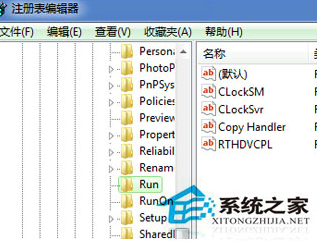
regedit
HKEY_LOCAL_MACHINE \ SOFTWARE \ Microsoft \ Windows \ CurrentVersion \ Run
c:\windows\system32\systray.exe
完成後重新登入或重開機,音量控制視窗即可正常彈出。
Win7 記事本打不開?重設關聯程式即可解決
Win 7 九大「絕不能關閉」系統服務:關閉即導致斷網、無法開機、DNS 失效、列印失效、RPC 崩潰
Win7 列印提示「Active Directory 網域服務目前無法使用」?重新新增印表機解決
Win7 取消「自動連線已儲存的無線網路」?右鍵無線網路屬性取消勾選即可
Win7局域网文件共享最简设置:开启Guest+关闭密码保护+高级共享权限三步走
加速 Vista 開機:停用磁碟索引服務與 Windows Search 完整步驟
Win7 內建小遊戲「圖片拼圖板」自訂圖片完整教學
Windows 7 性能大躍進:七大實用優化技巧全攻略