誤刪桌面小工具 (時鐘、日曆、CPU 監測等) 怎麼找回?Win7 內建「還原桌面小工具」功能,透過開始功能表搜尋即可喚出。

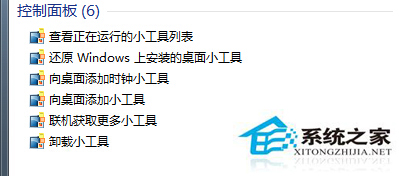
此功能僅還原系統內建小工具,第三方小工具需重新安裝。
3000 元想組裝 GTX 1060 遊戲電腦?預算不夠,建議調整期待或買二手
Win7 徹底移除 iTunes:備份資料庫 → 依序解除安裝 5 組 Apple 元件
Win7 如何移除工作列 NVIDIA 圖示?控制面板關閉通知區域圖示
Win7 修改任務列圖示後無法還原?「解鎖→改圖示→重新鎖定」三步徹底修改
Windows 10 設定網路自動時間卻仍慢兩分鐘?這樣檢查與修正
Win7 「備份與還原」無法啟動/建立系統映像?啟動 Windows Backup 服務解決
如何用 Win7/Win8.1/Win10 指令列設定靜態 IP?netsh interface ip set address 一行指令搞定