Win7 預設單視窗瀏覽,開啟新資料夾會覆蓋原視窗。啟用「在不同視窗中開啟不同的資料夾」即可多視窗並存,方便拖曳複製比對。
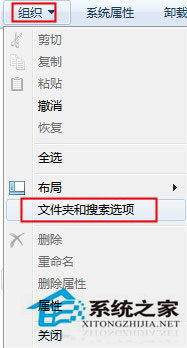
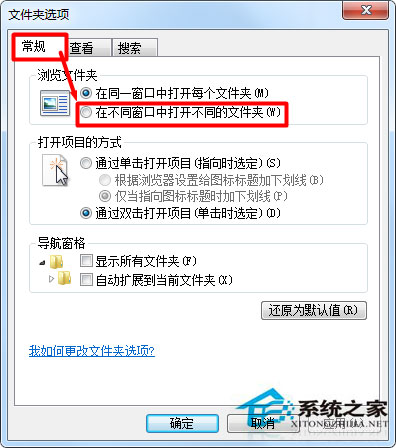
操作差異:
| 模式 | 行為 | 適用場景 |
|---|---|---|
| 單視窗 (預設) | 新資料夾取代當前視窗 | 簡單瀏覽、螢幕小 |
| 多視窗 | 每個資料夾獨立視窗 | 檔案整理、跨資料夾拖曳、比對內容 |
快捷鍵補充:單視窗模式下按住 Ctrl 雙擊資料夾 = 新視窗開啟;按住 Shift 右鍵資料夾 → 「在新視窗中開啟」。
Win7 Word 文檔提示「版本過低」無法打開?另存為 97-2003 格式完美兼容
Win7音乐播放卡顿?声卡驱动版本过新导致,降级安装合适版本驱动解决
Win7 遠端桌面提示「終端機伺服器超過最大連線數」?mstsc /admin 強制主控台連線並登出殘留會話
Win 7 系統屬性顯示 Service Pack 2 被竄改?註冊表 CSDVersion 修正還原真實版本
Win7 刪除檔案想救回來?Recover4all 免費資料救援完整教學
Win7 裝置管理員顯示裝置驅動未安裝/顯示卡驅動不正常?Windows Update 自動更新全修復
Win7 安裝軟體報錯「Command Line Option Syntax Error」?兩大成因:缺失 VC++ 運行庫與安裝路徑含中文/特殊字元