Windows XP Windows 7 Windows 2003 Windows Vista Windows 綜合教學 Linux 系統教學
Windows 10 Windows 8 Windows 2008 Windows NT Windows Server 電腦軟體教學

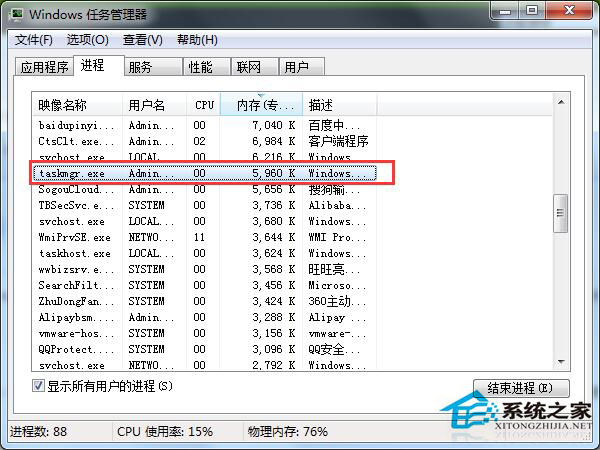
taskmgr.exe 是什麼程序?Win7 工作管理員本體與木馬偽裝辨識指南

編輯:Win7 系統應用技巧

工作管理員清單中出現 taskmgr.exe 佔用高資源?它正是「工作管理員」本身的執行程序。但木馬也常偽裝同名,本文教您三招辨識真偽與處理偽裝木馬。

正常 taskmgr.exe 特徵

  • 功能:工作管理員主程式
  • 觸發條件:使用者開啟工作管理員(Ctrl+Shift+Esc / Ctrl+Alt+Del)
  • 關閉行為:關閉工作管理員視窗即自動結束程序
  • 路徑:C:\Windows\System32\taskmgr.exe

木馬偽裝徵兆與處理

  1. 多重執行個體:同時間出現兩個以上 taskmgr.exe → 必有一為木馬
  2. 路徑異常:非 System32 目錄(如 C:\Windows\System\taskmgr.exe)
  3. 啟動項殘留:註冊表 HKLM\SOFTWARE\Microsoft\Windows\CurrentVersion\Run 含 Taskmgr 項

木馬清除步驟

  1. 全盤掃毒(建議離線/PE 模式)
  2. 刪除偽裝檔案(非 System32 路徑者)
  3. 註冊表刪除 Run 鍵下的 Taskmgr 啟動項
  4. 重開機驗證

工作管理員taskmgr.exe

關鍵觀念:正常 taskmgr.exe 為「被動啟動、主動關閉即結束」。若未開啟工作管理員卻常駐記憶體、或無法結束、或路徑異常 → 立即查殺。

Copyright © Windows教程網 All Rights Reserved