Windows XP Windows 7 Windows 2003 Windows Vista Windows 綜合教學 Linux 系統教學
Windows 10 Windows 8 Windows 2008 Windows NT Windows Server 電腦軟體教學

Win7 瀏覽器彈出「該頁正在存取其控制範圍外的資訊」解決辦法

編輯:Win7 系統應用技巧

此提示源於 IE 安全性設定阻擋跨域腳本存取。提供兩種解決方案:IE 設定調整與登錄修改。
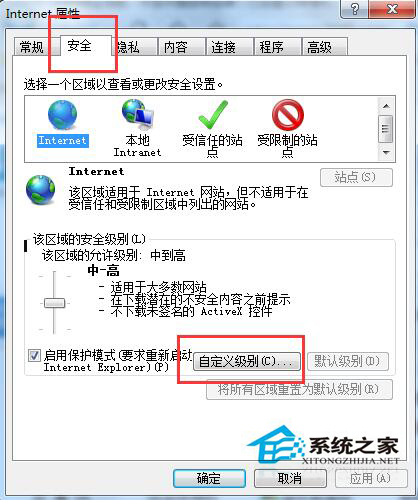
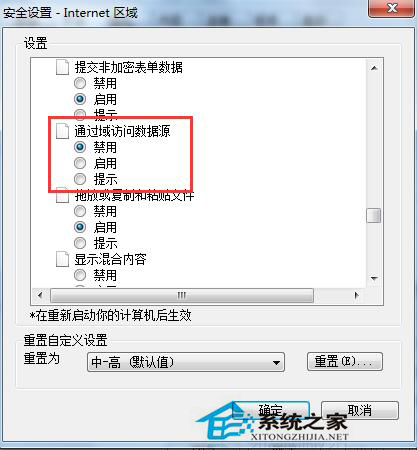
方法一:IE 內建設定調整(圖形介面)

  1. IE →「工具」→「網際網路選項」→「安全性」頁籤→「自訂等級」。
  2. 捲動至「其他」區段 →「跨域存取資料來源」選擇「**啟用**」→「確定」→「是」確認。

方法二:登錄快速修改(適用網管/大量部署)

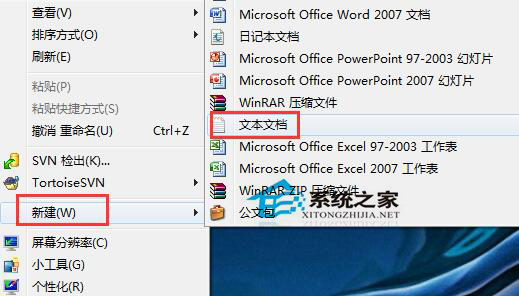
  1. 新建文字檔貼入以下內容:
Windows Registry Editor Version 5.00

[HKEY_CURRENT_USER\Software\Microsoft\Windows\CurrentVersion\Internet Settings\Zones\3]
"1406"=dword:00000000
  1. 另存為 fix_cross_domain.reg,雙擊匯入登錄表。

**注意**:啟用跨域存取會降低安全性,僅建議在信任內部網路環境使用。外部瀏覽建議維持預設「提示」或「停用」。

Copyright © Windows教程網 All Rights Reserved