Windows XP Windows 7 Windows 2003 Windows Vista Windows 綜合教學 Linux 系統教學
Windows 10 Windows 8 Windows 2008 Windows NT Windows Server 電腦軟體教學

Win7 ctfmon.exe 是什麼進程?功能詳解與異常處理建議

編輯:Win7 系統應用技巧

ctfmon.exe (Text Services Framework) 是 **Microsoft Office/Windows 文字服務核心進程**,負責輸入法、語音辨識、手寫輸入、語言列顯示等功能。

核心功能

  • 監控作用中視窗,提供文字輸入服務支援(IME、語音、手寫、翻譯)。
  • 管理語言列顯示/隱藏、輸入法切換熱鍵。
  • Win7/Vista/2008 **預設開機自動啟動**,缺失會導致輸入法異常(如空鍵誤觸發切換、無法選字)。

常見異常與修復

若輸入法列消失、熱鍵無效:

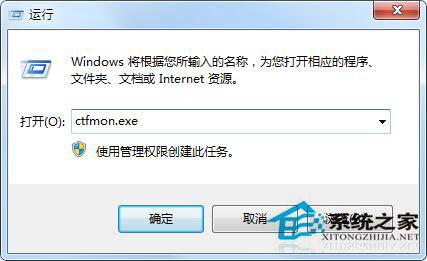
  1. Win+R → 輸入 ctfmon.exe → Enter 手動啟動。
  2. 若有效,將 C:\Windows\System32\ctfmon.exe 加入開機啟動(登錄 HKCU\Software\Microsoft\Windows\CurrentVersion\Run 或啟動資料夾)。
  3. 若執行無反應,系統檔案遺失,執行 sfc /scannow 或重灌系統。

安全性提醒

  • 正版位於 C:\Windows\System32\ctfmon.exe,其他路徑同名檔案極可能為木馬。
  • **切勿在工作管理員結束此進程**,會導致輸入法功能全失效。

ctfmon.exe 是現代 Windows 輸入體驗的基石,異常時優先修復而非禁用。

Copyright © Windows教程網 All Rights Reserved