兩大主因與解法:
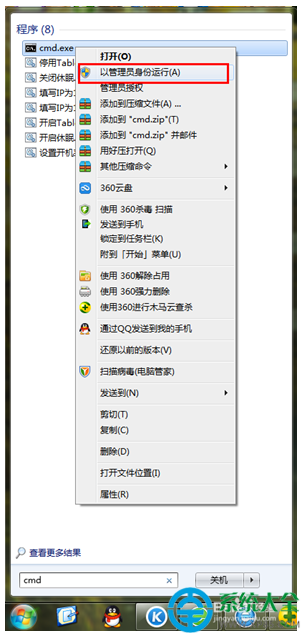
CMD(系統管理員)執行: netsh wlan set hostednetwork mode=allow 成功提示後重新開啟熱點即可。
netsh wlan set hostednetwork mode=allow
下載官網最新驅動或使用「驅動精靈/驅動人生」一鍵更新,重開機後重試。
亦可使用 Virtual Router、Connectify 等第三方熱點軟體繞過限制。
Win7 休眠後無法喚醒?開啟混合睡眠、更新驅動、電源設定完整修復教學
Win7 放大鏡快捷鍵速查:Win+加號開啟、三模式切換、倍率自由調
Windows 7 印表機卡紙原因分析與正確取出步驟圖解
Win7修改檔案預設開啟程式:三步走徹底搞定
Win7 網路圖示黃色驚嘆號無法上網?裝置管理員停用/啟用網卡重置連線
電腦音箱無聲音只有電流聲?排查驅動、線材、硬體四步驟
Win7 共享 Wi-Fi 熱點出現錯誤 1203?netsh 指令重置託管網路修復
Win7 遊戲偵測到仿真程式衝突無法執行?DAEMON Tools + YASU 完美解決