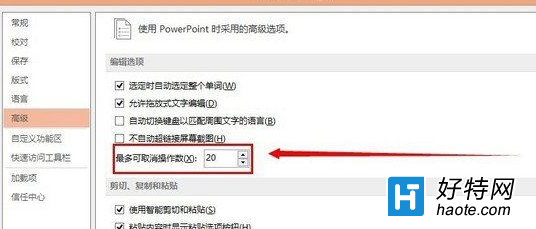
PowerPoint 預設最大復原次數為 20 步,若編輯複雜簡報可能不敷使用,或覺得佔用記憶體想減少。可在 PowerPoint 選項中自訂此數值(範圍 3-150)。
注意:設定過大可能增加記憶體佔用,建議視電腦規格調整(如 8GB 以上記憶體可設 50-100)。此設定僅影響 PowerPoint,Word/Excel 需分別設定。
Win7 快速複製檔案/資料夾完整路徑?Shift+右鍵選「複製成路徑」一鍵到剪貼簿
Win7 IE 瀏覽器無法開啟首頁怎麼修復?360 全盤掃毒與系統急救箱雙重修復
筆電如何恢復出廠設定?兩大層面完整操作指南
Win7 設定靜音快捷鍵:批次檔切換靜音/取消靜音 + 工作排程器定時靜音/開啟聲音 + F1 一鍵切換
Win7 滑鼠無法拖曳檔案?本機群組原則「禁止拖放」設為未配置/已停用一鍵恢復
Win7 安裝 RNDIS 驅動正確方法:裝置管理員手動指定 Microsoft Remote NDIS 相容裝置
Win7 清理 IE 瀏覽器右鍵選單多餘項目,登錄檔刪除 MenuExt 擴充功能
Win7 工作列變寬變胖?30 秒拖曳復原並鎖定教學