Windows XP Windows 7 Windows 2003 Windows Vista Windows 綜合教學 Linux 系統教學
Windows 10 Windows 8 Windows 2008 Windows NT Windows Server 電腦軟體教學

Windows 7 旗艦版 IE 瀏覽器故障修復:使用 regsvr32 重新註冊 actxprxy.dll

編輯:Win7 系統應用技巧

Internet Explorer 在 Windows 7 中常發生無法開啟視窗、點擊連結無反應等故障。重裝 IE 雖可嘗試,但耗時且不一定有效。實際上,透過命令提示字元重新註冊核心 DLL 檔案 actxprxy.dll,往往能快速修復 IE 功能異常。

修復步驟

  1. 按 Win + R 輸入 cmd 開啟命令提示字元(建議以系統管理員身分執行)。
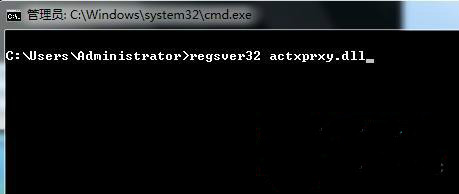
  2. 輸入指令:
    regsvr32 actxprxy.dll
    按 Enter,出現「DllRegisterServer 在 actxprxy.dll 中成功」提示視窗,點選確定。
  3. 關閉命令提示字元,重新開啟一次 cmd,再執行一次上述指令(雙重確保)。
  4. 重新開機,IE 應恢復正常瀏覽功能。

開啟執行輸入 cmd

regsvr32 actxprxy.dll 成功提示

原理說明:actxprxy.dll 是 ActiveX Proxy 元件,負責 IE 的物件嵌入與跨進程通訊。檔案損毀或註冊失效會導致 IE 核心功能失效。重新註冊可修復登錄項目。

Copyright © Windows教程網 All Rights Reserved