Windows XP Windows 7 Windows 2003 Windows Vista Windows 綜合教學 Linux 系統教學
Windows 10 Windows 8 Windows 2008 Windows NT Windows Server 電腦軟體教學

Win7 桌面小工具更新卡住?清除 Sidebar 快取資料夾、Windows Live Services 快取恢復流暢

編輯:Win7 系統應用技巧

桌面小工具突然停滯不更新,多為快取過大導致。清除 Sidebar 與 Windows Live Services 快取資料夾即可恢復正常運作。

清理步驟

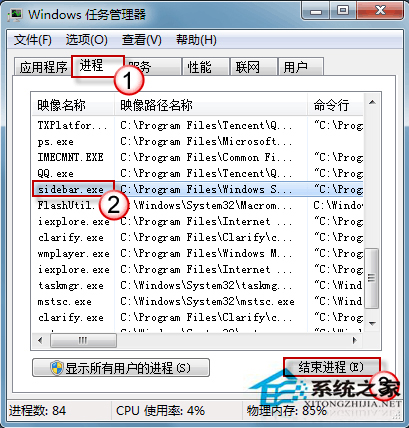
  1. 工作管理員 (Ctrl+Shift+Esc) → 結束 sidebar.exe 程序。
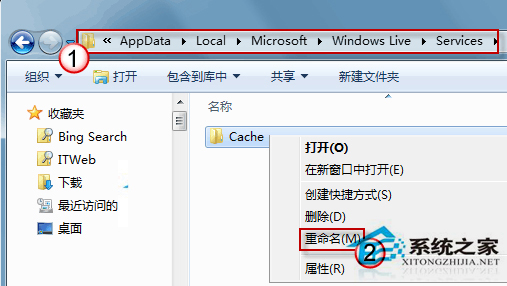
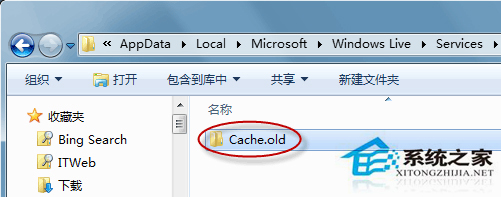
  2. 檔案總管地址列輸入 %localappdata%\Microsoft\Windows Live\Services → 將 Cache 資料夾重命名為 Cache.old。
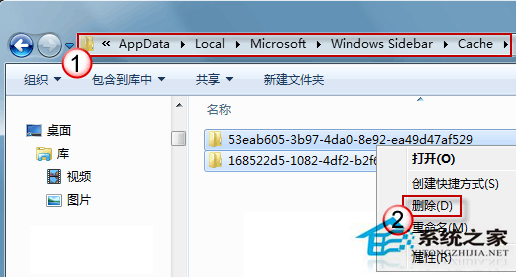
  3. 地址列輸入 %localappdata%\Microsoft\Windows Sidebar\Cache → 全選刪除所有快取檔。
  4. 若 %localappdata%\Microsoft\Windows Sidebar\Gadgets 下各小工具資料夾含 Cache 亦一併刪除。
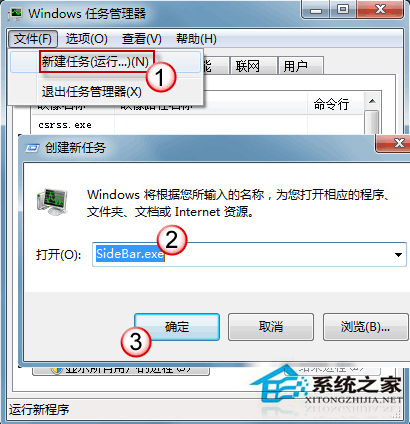
  5. 工作管理員 → 「檔案」→「新增工作」→ 輸入 sidebar.exe → 確定重新啟動小工具。

工作管理員結束 sidebar.exe

Windows Live Services Cache 重命名

Cache.old 重命名完成

Sidebar Cache 刪除檔案

重新啟動 sidebar.exe

建議小工具用完即關,避免同時開啟過多導致快取暴增卡頓。

Copyright © Windows教程網 All Rights Reserved