Office 上傳中心 (Office Upload Center) 背景同步文件至 SharePoint/OneDrive,任務列常駐圖示佔資源。msconfig 停用開機啟動項可徹底禁用,設定介面「隱藏」僅隱藏圖示不停止服務。
禁用步驟
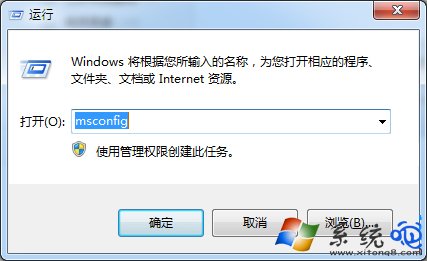
- Win+R >
msconfig 開啟「系統設定」。
- 切換「啟動」索引標籤,找到所有名稱含 「Microsoft Office 2010」 (或對應版本) 的項目,取消勾選。
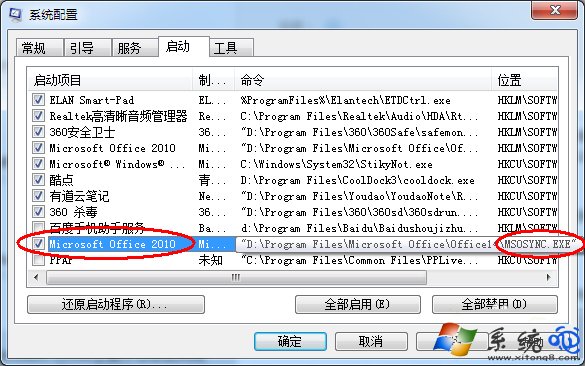
- 「確定」> 重開機,上傳中心不再自動啟動。
補充說明
- Office 2013/2016/365 同樣適用,啟動項名稱可能為「Microsoft Office 2013」、「Office 15」等。
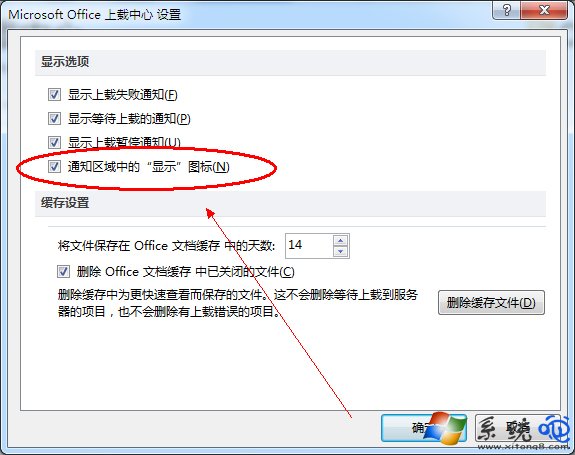
- 若需同步功能,可手動啟動「Microsoft Office Upload Center」程式,或在 Office 應用程式 >「檔案」>「辦公帳戶」>「上傳中心」設定中管理。
- 工作列圖示隱藏:上傳中心設定 >「通知區域圖示」>「隱藏」僅隱藏圖示,服務仍在背景運行。