Windows XP Windows 7 Windows 2003 Windows Vista Windows 綜合教學 Linux 系統教學
Windows 10 Windows 8 Windows 2008 Windows NT Windows Server 電腦軟體教學

Win7 安裝 Office 2010 錯誤 1719 解決:啟用 Windows Installer 服務並註冊 msi.dll

編輯:Windows 7 系統介紹

安裝 Office 2010 出現錯誤 1719,主因 Windows Installer 服務未啟動,需啟動服務並以管理員身分註冊 msi.dll。

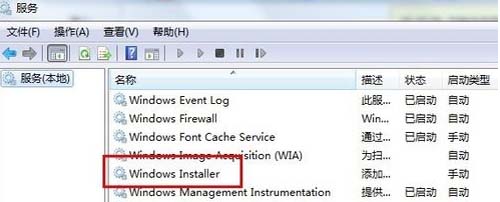
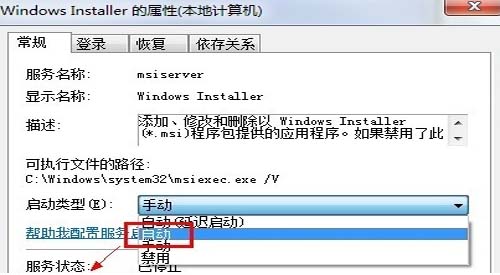
啟用 Windows Installer 服務

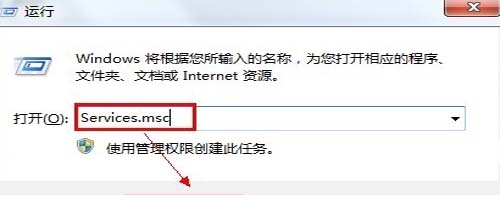
1. 按 Win+R 輸入 services.msc,找到 Windows Installer,右鍵「啟動」。
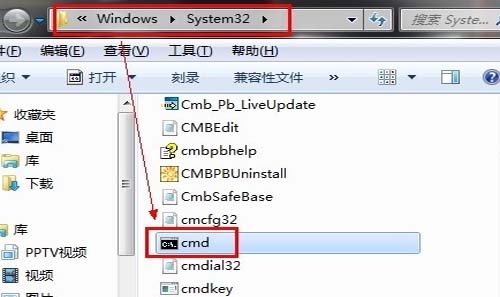
註冊 msi.dll

2. 以管理員身分開啟命令提示字元(C:\Windows\System32\cmd.exe)→輸入 regsvr32 msi.dll 按 Enter,出現成功訊息即可。


重新開機後重新安裝 Office 2010,錯誤 1719 即可解決。

Copyright © Windows教程網 All Rights Reserved