透過修改登錄檔 HKEY_CLASSES_ROOT\Directory\Background\shell,可在桌面右鍵選單中新增常用程式(記事本、QQ、截圖工具、滑動關機等)捷徑,右鍵即達,操作極速。
regedit 開啟登錄編輯程式。HKEY_CLASSES_ROOT\Directory\Background\shellshell 下右鍵新增「機碼」,命名為程式名稱(如 Notepad、QQ、SnippingTool)。command。command 的「預設」值,輸入程式完整執行路徑(含參數),確定。C:\Windows\System32\SnippingTool.exeC:\Windows\System32\SlideToShutDown.exeC:\Windows\System32\notepad.exe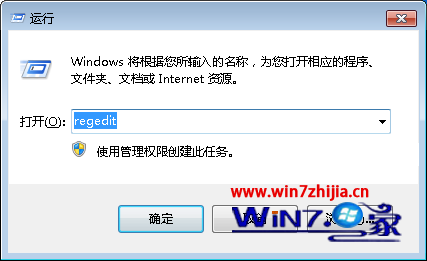
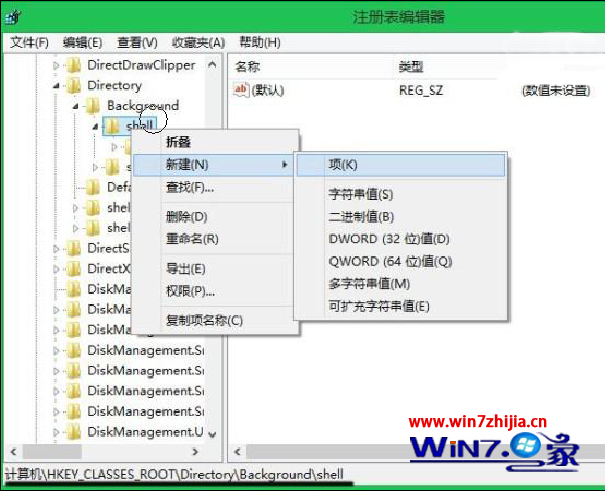
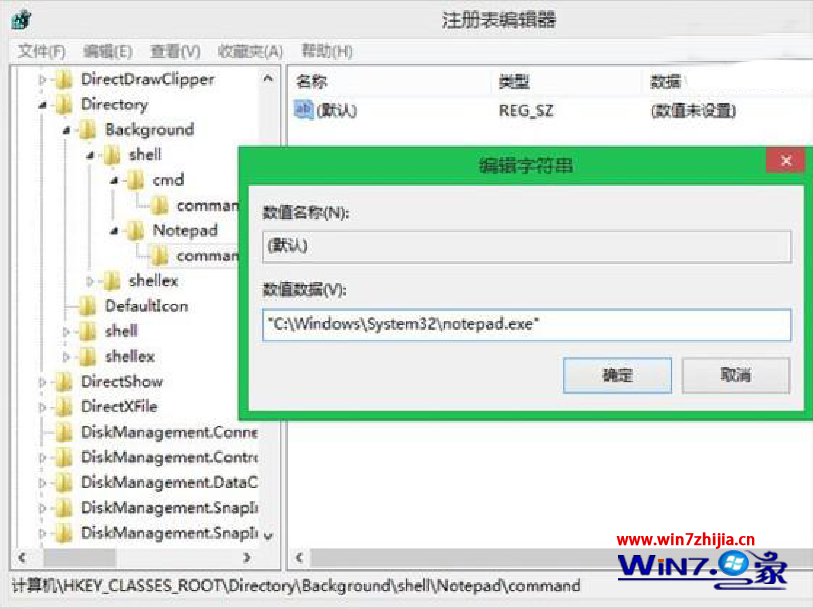
設定完成後,桌面空白處右鍵即可看到新增的程式選項,點擊即啟動,無需翻選單或桌面找圖示。
解決「儲存空間不足 無法處理此命令」:記憶體/虛擬記憶體/磁碟空間三維排查與擴容指南
善用 BitLocker To Go 為隨身碟加密:Win 7 內建、免安裝、跨平台可讀
Windows 7 指定處理器親和性:讓特定程式只在指定 CPU 核心執行
Win7 工作列高度怎麼調?修改登錄 MinThumbSizePx 自訂縮圖大小與列高
Windows 8 Metro 介面新增關機、重新開機捷徑磚教學
微軟證實 10 月 28 日發布 Windows 7 預覽版:PDC 大會釋出 Beta 1 前版本、M3 穩定性大增、傳聞 2009 年 6 月 3 日上市