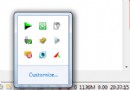
點擊動作中心圖示無反應,主因是 Security Center(安全中心)服務未執行。本文教您透過服務管理單元啟動服務並設為自動啟動,恢復系統安全監控功能。
修復步驟
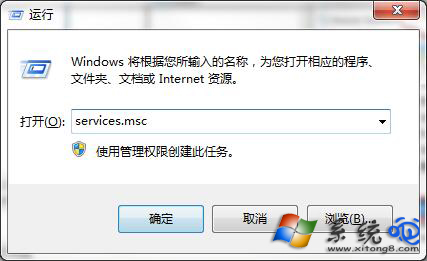
- Win+R 輸入
services.msc 開啟服務。
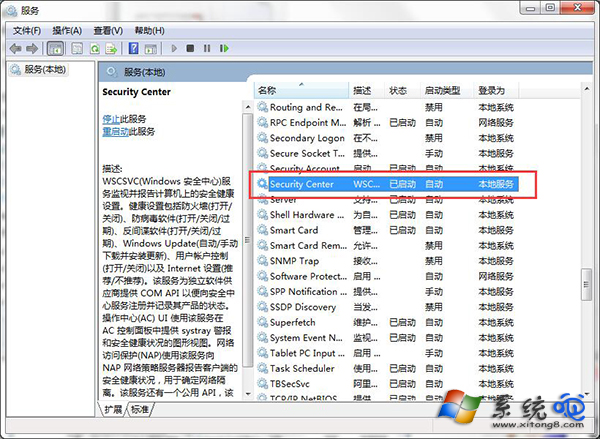
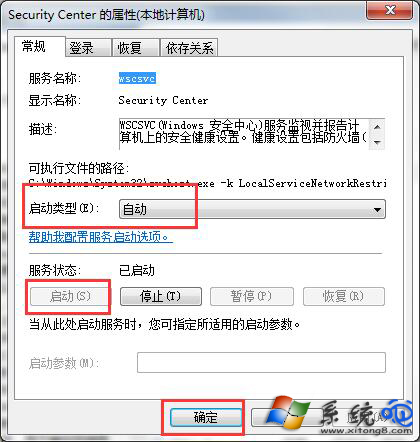
- 找到 Security Center → 雙擊開啟內容。
- 啟動類型 改為 自動 → 按 啟動 → 確定。
相關依賴服務檢查
若 Security Center 啟動失敗,請確認以下服務均為「自動/執行中」:
- Windows Management Instrumentation (WMI)
- Remote Procedure Call (RPC)
- Windows Event Log
命令列快速修復
sc config wscsvc start= auto
net start wscsvc
wscsvc 為 Security Center 服務名稱。
動作中心功能回顧
- 防毒/防火牆/更新狀態監控
- 使用者帳戶控制 (UAC) 設定
- 網路存取保護 (NAP) 狀態
- 維護訊息(備份、磁碟檢查、驅動更新等)