Windows XP Windows 7 Windows 2003 Windows Vista Windows 綜合教學 Linux 系統教學
Windows 10 Windows 8 Windows 2008 Windows NT Windows Server 電腦軟體教學

Win7 瀏覽器報錯 2001?360 瀏覽器醫生一鍵修復 Flash 元件

編輯:Windows 7 系統介紹

Windows 7 使用優酷等視訊網站時,播放至一半彈出「錯誤代碼 2001」,多半是 Flash Player 元件損壞或快取衝突。使用 360 安全瀏覽器內建「瀏覽器醫生」→「一鍵修復」,可自動檢測修復 Flash 相關元件與註冊表項,快速恢復視訊播放功能。
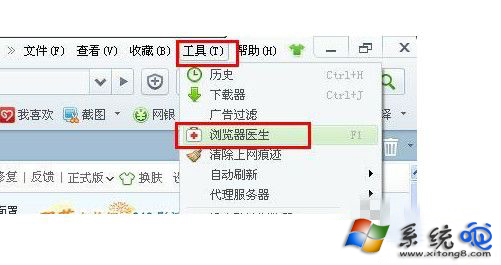

修復步驟

  1. 開啟 360 安全瀏覽器,點選右上角「工具」→「瀏覽器醫生」。
  2. 於掃描結果頁面,點擊「一鍵修復」按鈕。
  3. 修復完成後重新啟動瀏覽器,重新載入視訊頁面測試。

360 瀏覽器醫生入口

一鍵修復按鈕

補充說明

  • 若修復後仍報錯,請手動刪除 Flash 快取資料夾:C:\Windows\System32\Macromed\Flash 及 C:\Users\用戶名\AppData\Roaming\Macromedia\Flash Player 內容,再重裝最新 Flash Player(雖 Adobe 已停止支援,部分舊站仍需)。


  • 現代瀏覽器已全面封鎖 Flash,建議優先使用 HTML5 播放器的網站(如 YouTube、Bilibili、Netflix 等)。
Copyright © Windows教程網 All Rights Reserved