開機出現錯誤畫面、按 F8 無法進入進階開機選單 (安全模式/最後一次正確設定),且系統磁碟無重要資料時建議直接重灌;若需保留資料,可使用 Windows 7 安裝光碟/USB 進入 WinPE 環境,透過 bcdedit 修復開機設定資料 (BCD)。
cd c:\windows\system32
bcdedit /set {default} osdevice boot
bcdedit /set {default} device boot
bcdedit /set {default} detecthal 1
逐行輸入並按 Enter。執行完成後重新開機,系統應能正常進入 Windows。
osdevice boot / device boot:指定作業系統裝置與開機裝置為「開機分區」。detecthal 1:啟用硬體抽象層 (HAL) 自動偵測,修正硬體變更導致的開機失敗。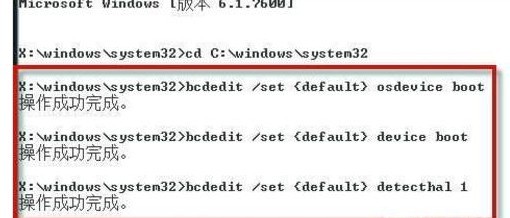
此法適用於 BCD 遺損、硬體變更、多重開機設定錯誤等情況。若修復後仍無法開機,建議進入 WinPE 備份資料後重新安裝。