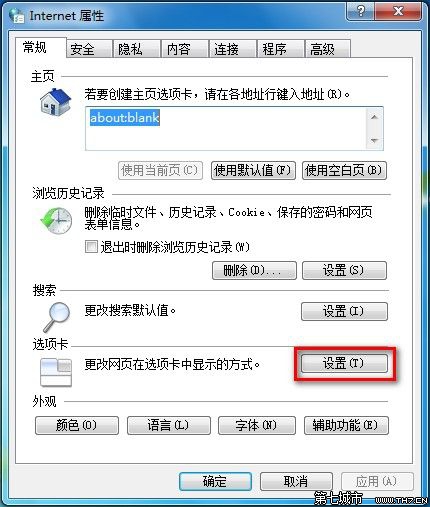
關閉 IE 視窗時彈出「要關閉所有索引標籤嗎?」想關閉提示?
設定即時生效,無需重開機。
Win7 系統透明效果如何關閉:針對拖動視窗只剩邊框的設定教學
Win7 清除檔案總管搜尋記錄四大法:魔方、手動 Del、登錄檔、群組原則
Win7 無法顯示 Aero 特效?檢查設定與自動修復雙管齊下
Windows 7 開機自動開啟數字小鍵盤 5 種方法與 Linux 設定對照
Win 7 虛擬機安裝 Win 7 完整圖文教學:Hyper-V / Virtual PC 實戰
Win7 如何快速批量刪除 .svn 資料夾?匯入登錄表右鍵選單一鍵清理
Windows 7 Aero 效果異常?內建疑難排解 + 登錄強制啟用雙重修復
Win7 點擊 IE「網際網路選項」無反應?本機群組原則一鍵解鎖