Win7 刪除大量檔案時進度條卡住、速度極慢?啟用並設定 Application Experience 與 Program Compatibility Assistant Service 為「自動」啟動,可大幅提升刪除效能。
設定步驟
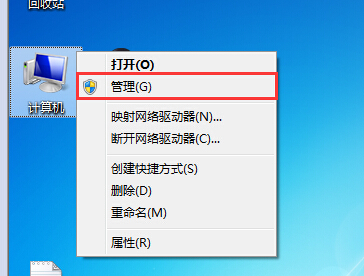
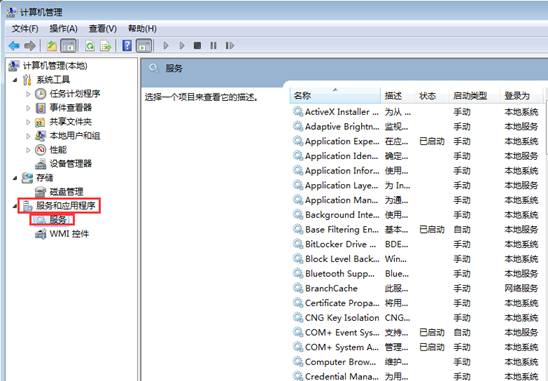
- 右鍵「電腦」→「管理」→「服務與應用程式」→「服務」。
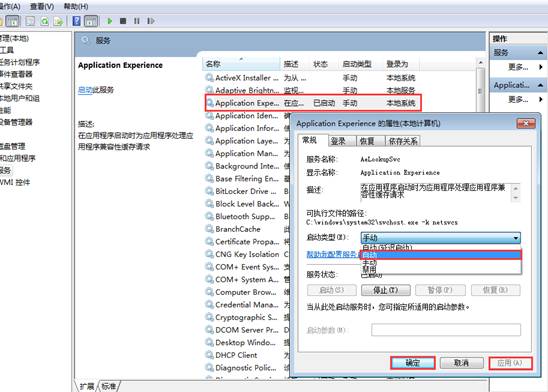
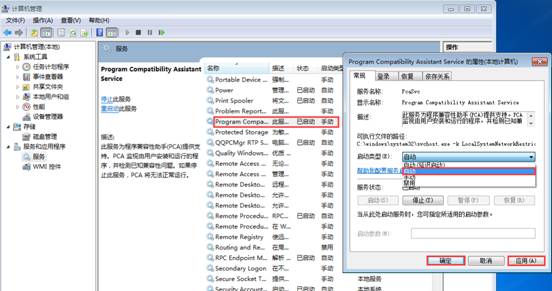
- 找到 Application Experience 與 Program Compatibility Assistant Service。
- 確認狀態為「已啟動」,若否則右鍵「啟動」。
- 雙擊各服務 →「啟動類型」改為「自動」→「確定」。
原理
- Application Experience: 處理應用程式相容性快取、檔案作業歷程記錄,缺失時刪除檔案需重新計算相容性資訊導致延遲。
- Program Compatibility Assistant Service: 偵測舊程式安裝/執行問題,協助檔案作業快速完成相容性檢查。
其他加速刪除技巧
- 命令提示字元用
del /f /s /q 路徑\* 批次刪除繞過總管介面。
- 關閉防毒軟體即時掃描 (臨時) 再刪除大量檔案。
- 使用
Shift+Delete 直接永久刪除不經資源回收筒。