想確認手邊 Win7 是否為正版、查看啟用狀態、授權類型(零售/OEM/大量授權)與剩餘重置次數?一行指令即可呼叫詳細授權資訊視窗。
操作方法
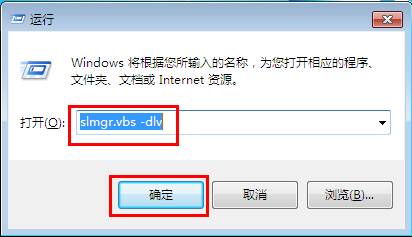
- Win+R 輸入
slmgr.vbs -dlv 按 Enter。
- 稍待片刻,彈出「Windows Script Host」視窗,顯示完整授權資訊。
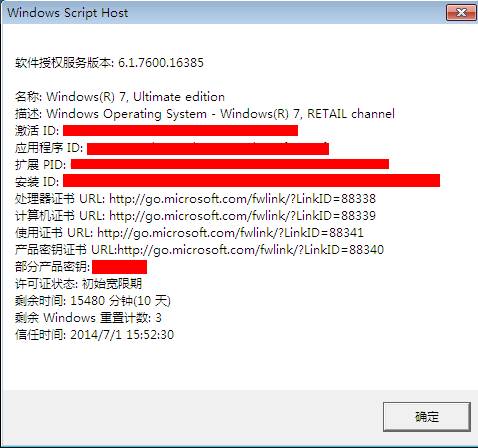
關鍵欄位說明
- Name / Description:作業系統版本名稱(如 Windows 7 Enterprise)。
- Partial Product Key:產品金鑰後 5 碼。
- License Status:授權狀態(Licensed / Notification / Unlicensed)。
- Activation ID / Extended PID:啟用識別碼與擴充 PID。
- Remaining Windows rearm count:剩餘重置啟用期限次數(預設 3 次,
slmgr -rearm 可重置)。
- Trusted time:受信任時間來源。
其他實用 slmgr 指令
slmgr -xpr:顯示永久啟用或到期日。slmgr -dli:簡易授權資訊(無 Extended PID)。slmgr -ato:嘗試線上啟用。