File:\Boot\BCD 錯誤代表開機設定資料 (BCD) 損毀,導致無法載入 Windows。需使用 WinPE 環境修復。
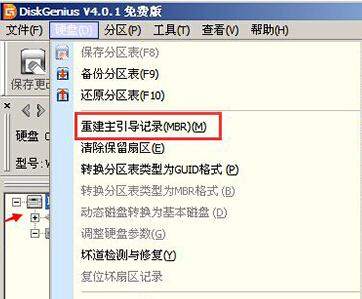
方案一:DiskGenius 重建 MBR
- 使用 USB 開機進入 WinPE,執行 DiskGenius 分區工具。
- 選單「硬碟」→「重建主開機記錄 (MBR)」→ 確定。
方案二:WinPE 內建「Windows 開機修復」
- 進入 WinPE 桌面,尋找並執行「Windows 開機修復」捷徑。
- 工具會自動掃描並修復 BCD、MBR 等開機項目。
修復完成後移除 USB 重新開機,通常可正常進入系統。