Windows XP Windows 7 Windows 2003 Windows Vista Windows 綜合教學 Linux 系統教學
Windows 10 Windows 8 Windows 2008 Windows NT Windows Server 電腦軟體教學

Win7 桌面圖示變大怎麼縮小?開始功能表圖示大小調整教學

編輯:Windows 7 系統介紹

調整 Windows 7 開始功能表與桌面圖示大小

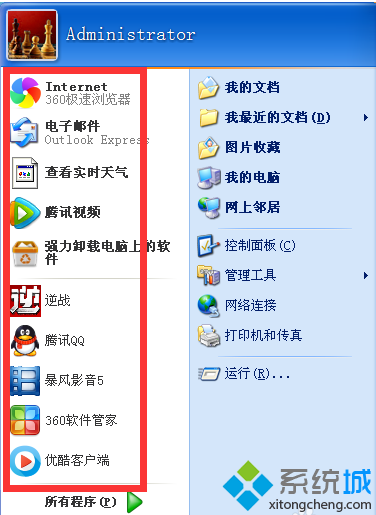
Windows 7 開始功能表程式圖示過大,可透過「自訂開始功能表」調整為小圖示,同時增加顯示程式數量。

操作步驟

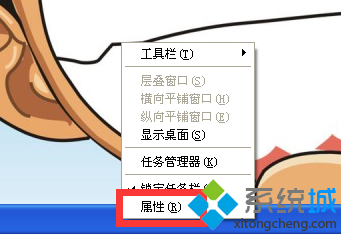
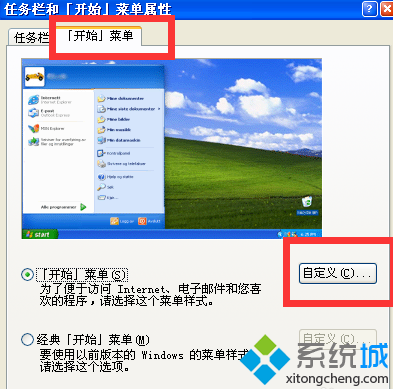
  1. 工作列空白處右鍵 → 「屬性」→「開始功能表」頁籤 → 「自訂」。
工作列屬性 開始功能表頁籤
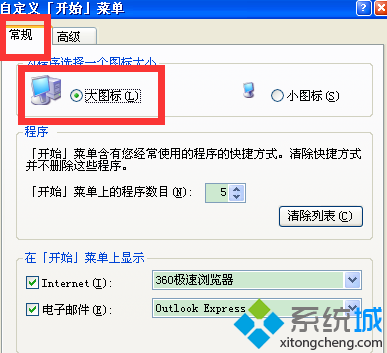
  1. 在「自訂開始功能表」視窗,取消勾選「使用大型圖示」(或將「圖示大小」設為「小圖示」)。
  2. 將「開始功能表中的程式數目」調大(如 10-15),點擊「確定」兩次套用。
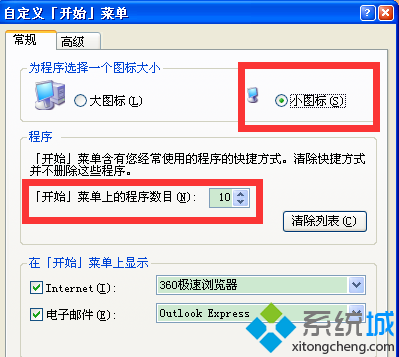
自訂開始功能表視窗 選擇小圖示 設定程式數目

桌面圖示大小調整:桌面空白處按住 Ctrl 滾動滑鼠滾輪,或右鍵「檢視」選擇「大型/中型/小型圖示」。

Copyright © Windows教程網 All Rights Reserved