解決 Win7 磁碟重組工具卡在 0% 或報錯問題
Windows 7 磁碟重組若長時間停留在「偵測中 0%」或顯示錯誤,通常是磁碟暫存檔、垃圾檔過多干擾。先執行「磁碟清理」再重組即可解決。
操作步驟
- 「開始」→「所有程式」→「附屬應用程式」→「系統工具」→「磁碟清理」。
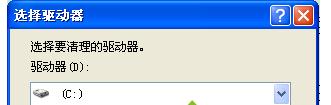
- 選擇欲重組的磁碟機(通常為 C:),點擊「確定」掃描可清理檔案。
- 勾選所有項目(暫存檔、回收站、縮圖快取等),點擊「確定」→「刪除檔案」等待完成。
- 清理完成後,再次開啟「磁碟重組工具」(同目錄下),選擇同一磁碟機點擊「重組磁碟」,即可順利執行。
補充:固態硬碟(SSD)不需也不建議執行磁碟重組,Windows 7 會自動偵測並停用排程。