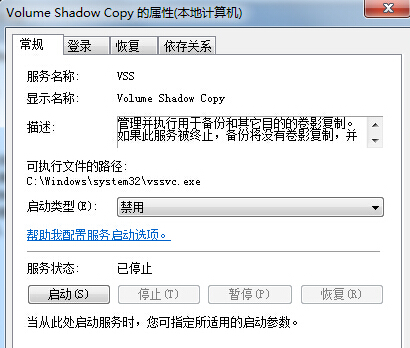
停用非必要服務可減少硬碟讀寫,延長機械硬碟壽命:
services.msc
視使用習慣調整,SSD 建議保留 SuperFetch (Win7 無針對 SSD 優化),HDD 停用效果明顯。
Win7 系統保護、系統映像、排程備份三大差異一次搞懂
Windows 7 網銀無法開啟頁面?註冊表修正加密服務提供者路徑完整解決方案
Win7徹底禁用粘滯鍵彈窗:關閉快捷鍵觸發與無障礙設置
Win7 系統遭惡意軟體入侵的四大癥狀總整理
鮑爾默:今年 Win 7 裝置出貨量將達 3.5 億台,Windows 8 將挑戰 iPad 霸主地位
挖掘 Windows 7 隱藏功能:一行指令架設自己的 Wi-Fi 基地台
Win 7 大容量硬碟分區策略:系統盤 50GB、程式獨立盤、資料分類盤完整規劃
UltraISO 製作 Win7 USB 開機安裝碟 步驟圖解:開啟 ISO、寫入硬碟映像、格式化、驗證、安裝注意事項