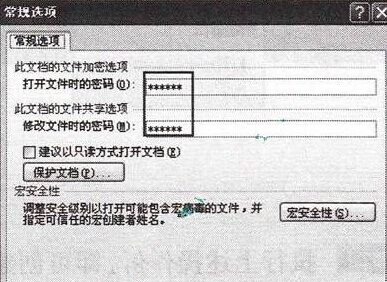
Word 內建加密功能可設定「開啟檔案密碼」與「修改檔案密碼」雙重保護。
下次開啟需輸入開啟密碼,唯讀模式下需輸入修改密碼才能編輯。遺忘密碼無法破解,請妥善保管。
刪除 Win7 通知區域殘留無效圖示的註冊表法
Win7 一鍵隱藏/顯示桌面圖示:保持桌面整潔又不失效率
Win7 群組原則深度安全強化:資料防洩、瀏覽器免疫、權限管控、軟體限制四大支柱
Win7 與 XP 共存環境下的資源共享疑難雜症:共享印表機與 FTP 穿透防火牆
Windows 7 程式無回應/無法執行?相容模式與疑難排解兩大解方
解決 Windows 7 看電影雙語並行(雙音軌同時播放):聲音裝置平衡調整教學
Windows 7 十大隱性安全特性深度解析
Win7 一鍵同步所有資料夾檢視模式:設定一個,全系統套用