關機時系統等待程式回應導致卡住,啟用 AutoEndTasks 讓系統自動結束無回應程式並關機。
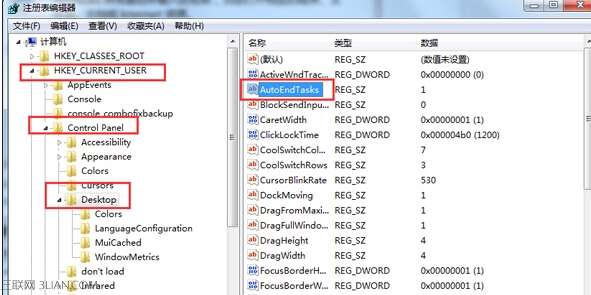
AutoEndTasks
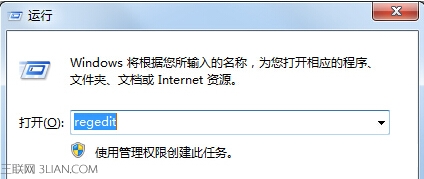
regedit
HKEY_CURRENT_USER\Control Panel\Desktop
0
1
Win7 內建螢幕色彩校正工具 (DCCW) 完整操作教學
Win7 拖曳視窗只顯示邊框、內容消失?關閉 Aero 特效即可解決
Win7 查看區域網路其他電腦 IP:net view 與 ping 指令快速掃描
Win7 關閉視窗智慧排列 (Aero Snap):登錄檔 WindowArrangementActive 改 0
網卡啟動安裝 Windows 7 (WDS 部署服務):需 Win2008/R2 域控制器、PXE 啟動、DHCP、網路互連
Windows 7 提速技巧:關閉不必要動畫保留 Aero 玻璃效果
Win7 資料夾「未回應」頻發?關閉 Windows Defender 即時保護可緩解
微軟發布 Windows 7 產品路線圖:簡體中文版本優先釋出