Win7 系統時間漂移,啟用網路時間同步即可自動校正。
1. 點擊工作列右下角時間 → 「變更日期和時間設定」。
2. 「網際網路時間」索引標籤 → 「變更設定」。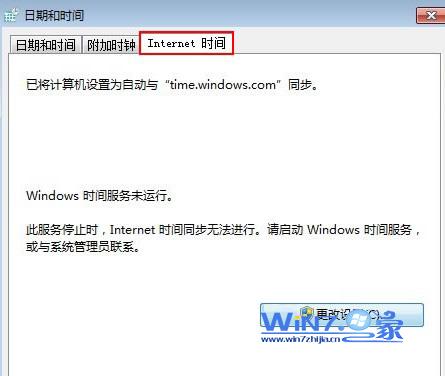
3. 伺服器選擇 time.windows.com → 「立即更新」。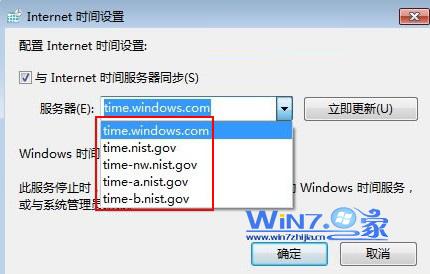
4. 顯示「時鐘與 time.windows.com 同步成功」,以後每週自動同步。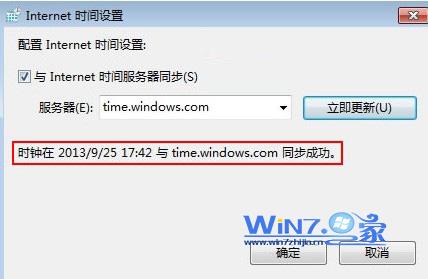
Windows 7 磁碟重組教學:內建工具最安全、建議每月一次
Win7 登錄編輯器無法開啟?群組原則解鎖與病毒排查雙管齊下
Win7 內建 ZIP 解壓 vs WinRAR/7-Zip:註冊表移除系統關聯或直接修改開啟方式
Win7 無線網路連線超簡單:工作列圖示一鍵掃描、連線、自動記憶、信號強度即時看
Win7 旗艦版如何停用智慧卡服務?組策略禁用四項相關服務教學
MacBook 安裝 Windows 7 完整指南:Boot Camp 支援、驅動現況與效能實測
Win7 純淨版開啟 WiFi 共享大師手機搜尋不到熱點?五大排查方案與驅動更新建議
Win7 常見故障大全:附件消失/登入介面 DIY/Aero 失效/遊戲不全螢幕/聲音忽大忽小/縮圖異常 六大問題解決方案