Windows XP Windows 7 Windows 2003 Windows Vista Windows 綜合教學 Linux 系統教學
Windows 10 Windows 8 Windows 2008 Windows NT Windows Server 電腦軟體教學

Win7 64位 任務列「顯示桌面」圖示消失?建立 .scf 捷徑恢復快速啟動列

編輯:Windows 7 系統介紹

Win7 快速啟動列的「顯示桌面」圖示遺失時,可手動建立 Show Desktop.scf 檔案拖入快速啟動列恢復功能。

建立步驟

  1. 桌面右鍵 → 新增文字文件 → 貼入:
[Shell]
Command=2
IconFile=explorer.exe,3
[Taskbar]
Command=ToggleDesktop
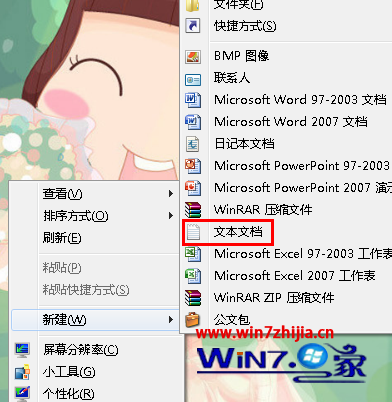
SCF 內容
  1. 「檔案」→「另存新檔」→ 檔名 顯示桌面.scf → 存檔類型「所有檔案」 → 存檔。
  2. 桌面出現圖示 → 拖曳至快速啟動列(工作列解鎖後可見)。
若找不到快速啟動列:工作列右鍵 → 工具列 → 新增工具列 → 資料夾路徑輸入 %AppData%\Microsoft\Internet Explorer\Quick Launch → 選取資料夾。

替代方案:直接使用 Win+D 快速鍵顯示桌面,同樣高效。

Copyright © Windows教程網 All Rights Reserved