Windows XP Windows 7 Windows 2003 Windows Vista Windows 綜合教學 Linux 系統教學
Windows 10 Windows 8 Windows 2008 Windows NT Windows Server 電腦軟體教學

Win7 升級 Win10 後 Office 2013 檔案無法開啟?修復安裝或 icacls 指令修復權限

編輯:Windows 7 系統介紹

升級 Win10 後 Office 2013 開啟 Word/Excel/PPT 檔案報錯(檔案損毀、應用程式無法啟動等),實為權限相容性問題。提供兩種修復方案。

方案一:Office 修復安裝(需安裝媒體)

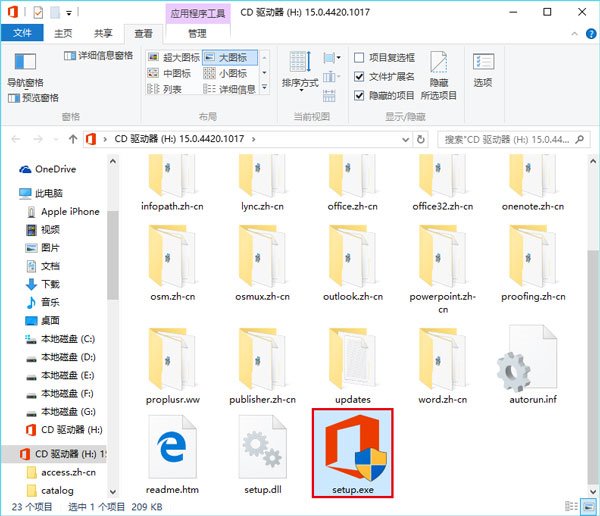
  1. 掛載 Office 2013 ISO 或插入光碟 → 雙擊 setup.exe → 選「修復」。
Office 修復安裝

方案二:管理員 CMD 執行 icacls 指令(無需安裝媒體)

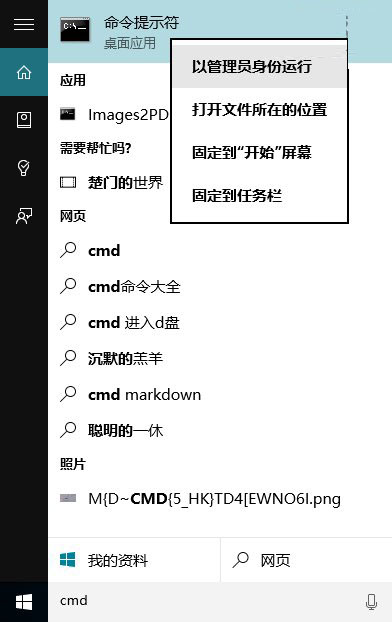
  1. Cortana 搜尋 CMD → 右鍵「以系統管理員身分執行」。
管理員 CMD
  1. 執行:
icacls "%programfiles%\Microsoft Office 15" /grant *S-1-15-2-1:(OI)(CI)RX
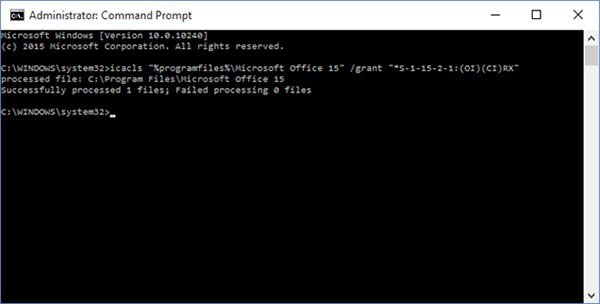
  1. 提示「成功處理 1 個檔案」即完成,無需重開機,Office 檔案即可正常開啟。
icacls 執行結果
指令將 ALL APPLICATION PACKAGES (S-1-15-2-1) 授予 Office 15 目錄讀取/執行權限,解決 Win10 AppContainer 隔離導致的存取拒絕問題。

Copyright © Windows教程網 All Rights Reserved