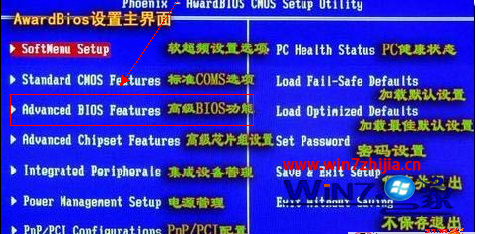
開機按 ESC 進入啟動選單卻偵測不到 USB 隨身碟,主因是 BIOS 中 Legacy USB Support 被停用。啟用後即可在非作業系統環境下識別 USB 裝置。
Legacy USB Support:在傳統作業環境(如 DOS、開機選單、BIOS)下支援 USB 裝置。若為 Disabled,未進入作業系統前無法識別 USB 隨身碟、USB 鍵盤等裝置。
Windows 7 大幅強化超執行緒支援,效能釋放再升級
IE8 首頁被惡意修改?挖掘 Windows 7 內建網路安全指令自救指南
Win7全螢幕播放影片畫面卡住聲音正常?關閉AGP紋理加速與硬體加速修復
Windows 7 小技巧:拖放檔案至工作列圖標快速建立關聯
Win7 旗艦版善用「連絡人」功能整合 Windows Live Mail 快速寄送郵件
Win7 清理通知區域多餘圖示:註冊表刪除 PastIconsStream 舊項目
Win7如何顯示/隱藏鼠標懸停提示?文件夾選項一鍵切換
U大俠 USB 開機碟製作與安裝 Windows 7 完整圖文教學