現象:插入 USB 後資源管理員停止回應、桌面圖示消失、任務列凍結,但滑鼠能動
典型 explorer.exe 掛起:USB 裝置通知處理死循環、或殼擴充套件(如第三方壓縮軟體右鍵選單)處理 USB 卷標時死鎖。
快速恢復:重啟 explorer.exe
- Ctrl+Shift+Esc 開啟工作管理員(或任務列右鍵)。
- 「程序」分頁 → 找 explorer.exe → 右鍵「結束程序」。桌面/任務列會消失,正常。
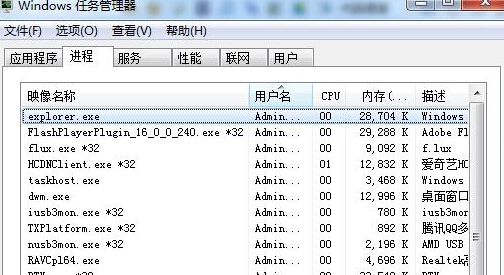
- 工作管理員選單列 → 「檔案」→「新增工作 (執行...)」→ 輸入
explorer.exe → 確定。桌面/任務列恢復,USB 可正常讀取。
根治建議
- 更新 USB 3.0/3.1 控制器驅動(主機板官網)。
- 移除第三方殼擴充套件(用 ShellExView 停用非 Microsoft 簽署項)。
- 檢查 USB 隨身碟是否壞軌(
chkdsk X: /f)。