故障現象:無線網卡無法啟用,服務啟動失敗報錯 1067
聯想筆電 Win7 更新/重灌後,Intel 無線網卡驅動若非官方版本,常導致 Wireless PAN DHCP Server 服務無法啟動,進而拖垮整張網卡。
修復步驟
- 官網下載對應機型 Intel 無線網卡驅動(勿用驅動精靈),完整安裝重開機。
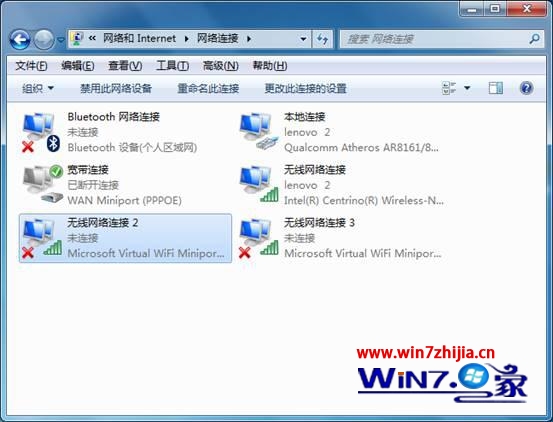
- 控制台 → 網路和網際網路 → 網路連線 → 右鍵「區域連線」→「內容」→「共用」分頁 → 勾選「允許其他網路使用者透過此電腦的網際網路連線來連線」→ 下拉選無線網卡連線名稱 → 「設定」全勾選 → 確定。
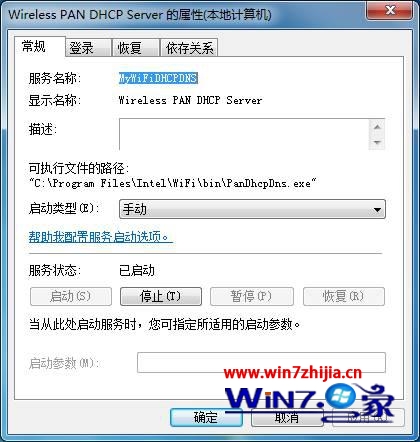
- 右鍵「計算機」→「管理」→ 「服務與應用程式」→「服務」→ 找 Wireless PAN DHCP Server → 雙擊 → 「啟動類型」改「自動」 → 「啟動」 → 確定。
原理解析
Intel 無線網卡虛擬 AP 功能需此服務分配 DHCP IP。驅動版本不對或服務停用,虛擬 AP 無法啟動,導致實體無線網卡也跟著掛掉(錯誤 1067:程序意外終止)。