Windows XP Windows 7 Windows 2003 Windows Vista Windows 綜合教學 Linux 系統教學
Windows 10 Windows 8 Windows 2008 Windows NT Windows Server 電腦軟體教學

Windows 7 修改系統預設快速鍵教學:使用 eXeScope 編輯 shell32.dll

編輯:Windows 7 系統介紹

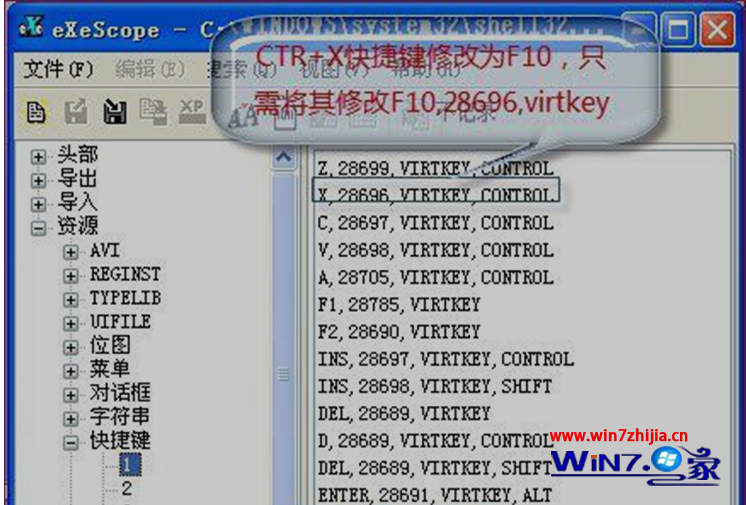
Windows 7 系統熱鍵定義於 shell32.dll 資源區段,可用 eXeScope 等資源編輯器修改。以將 Ctrl+X 改為 F10 為例:

操作步驟

  1. 開啟 eXeScope,左側選「資源」→「加速鍵」,在 1、2、3 等子項中找到目標熱鍵。
  2. 命名規則:「次鍵, 編碼, virtkey, 主鍵」。
    Ctrl+X 對應值為 x, 28696, virtkey, control。
    修改為 F10:F10, 28696, virtkey(無主鍵)。
  3. 「編輯」→「儲存更新」。
  4. 進入 WinPE 環境,用修改後的 shell32.dll 取代系統原檔(C:\Windows\System32\shell32.dll)。

警告: shell32.dll 為核心系統檔,修改前務必備份,且勿設定與現有熱鍵衝突,否則可能導致介面異常或無法操作。

Copyright © Windows教程網 All Rights Reserved