Win7 內建桌布輪換僅提供固定間隔 (10秒~1天) 且無動畫調整。修改註冊表可精確控制間隔 (毫秒) 與淡入淡出動畫時長。
cool.reg:Windows Registry Editor Version 5.00[HKEY_CURRENT_USER\Control Panel\Personalization\Desktop Slideshow]"Interval"=dword:0000ea60 (間隔,十六進位,ea60 = 60000ms = 1分鐘)"Shuffle"=dword:00000000 (0=循序, 1=隨機)"AnimationDuration"=dword:00002328 (動畫時長,2328 = 9000ms = 9秒)cool.reg 匯入註冊表,無需重開機即時生效。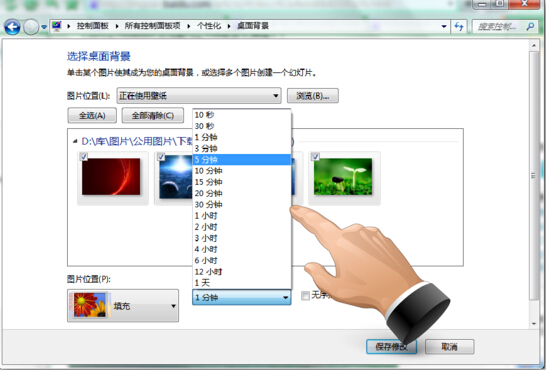
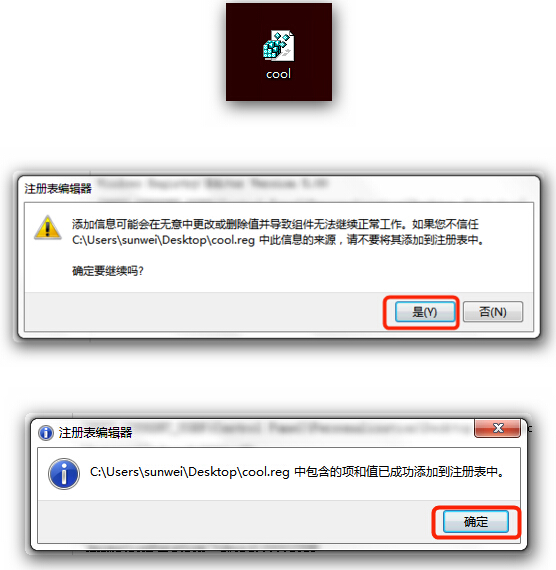
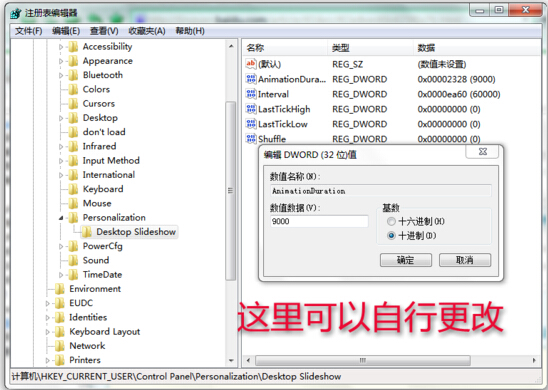
Interval:輪換間隔 (毫秒,十六進位)。00002710=10秒, 0000ea60=1分鐘, 00036ee80=1小時。AnimationDuration:淡入淡出動畫持續時間 (毫秒)。預設 1000ms,設大可產生緩慢 Morph 效果。Shuffle:0=順序播放,1=隨機播放。開啟 regedit → 刪除 HKEY_CURRENT_USER\Control Panel\Personalization\Desktop Slideshow 下的 AnimationDuration 鍵值即可。