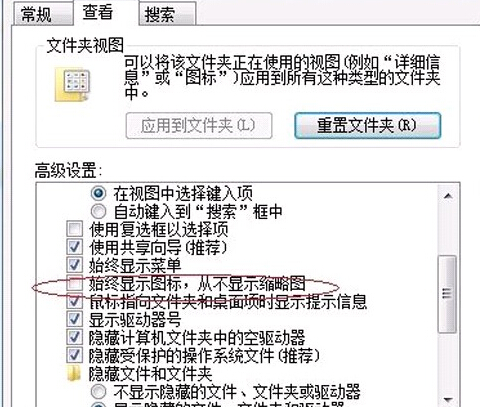
Win7 資源管理員預設會顯示圖片縮圖,若突然變成通用圖示,通常是「永遠顯示圖示,不顯示縮圖」選項被誤勾選。
若問題持續,可嘗試清除縮圖快取:執行 cleanmgr → 勾選「縮圖」 → 確定清理,或手動刪除 %LocalAppData%\Microsoft\Windows\Explorer\thumbcache_*.db 檔案後重開機。
cleanmgr
%LocalAppData%\Microsoft\Windows\Explorer\thumbcache_*.db
Win7 經常掉線?關閉網卡電源管理恢復穩定連線
Win7 藍牙右鍵「傳送到」消失?建立 fsquirt.exe 捷徑到 SendTo 資料夾恢復
Windows 7 路由器進不去解決方案(重複 77885)
安裝 Windows 7 完整注意事項:安裝方式選擇、全新安裝、驅動備份、Windows.old、硬碟空間
Windows 7 中 IPv6 協定該不該關閉?詳細解析 IPv6 優勢與必要性
Win7 旗艦版設定家庭群組網路存取權限(密碼保護共用)
Win7 旗艦版更改電腦睡眠時間:電源選項自訂待機/睡眠/關閉螢幕時程
關閉 Win7 視窗自動對齊(Aero Snap):透過「輕鬆存取中心」停用滑鼠邊緣吸附