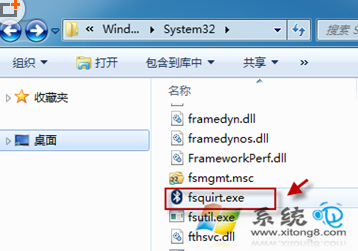
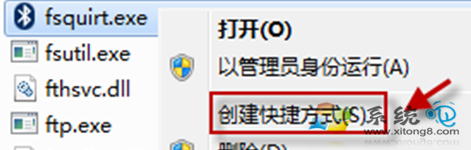
Win7 右鍵「傳送到」找不到藍牙裝置?系統內建藍牙傳輸工具 fsquirt.exe 未在 SendTo 選單中。手動建立捷徑即可恢復右鍵快速傳檔。
fsquirt.exe
%windir%\system32
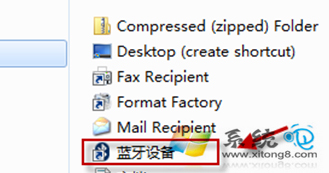
shell:sendto
右鍵任意檔案 →「傳送到」→「藍牙裝置」 → 選擇配對裝置 → 傳送。
Windows 7 關閉錯誤報告彈出視窗:註冊表 DontShowUI=1 讓錯誤靜默上傳
Windows 7 斷網終極解決方案:驅動更新、IPv6 關閉、DNS 無回應完整排查
哪些硬體需要安裝驅動程式?Windows 7 硬體驅動分類指南
在 Vista/Windows 7 進行 IPX 協定網路對戰:帝國時代 2、浩方、QQ 對戰平台完整教學
Win7 螢幕旋轉功能教學:控制台與顯卡驅動雙管道調整方向
Win7 旗艦版設定電腦睡眠時間(電源選項)
Windows 7 被忽略的 7 大實用功能:便利貼、計算器升級、問題步驟記錄器等
Windows 7 Beta 1 深度體驗:效能、介面與核心架構全面進化