區域連線顯示「已停用」無法啟用,可透過重設網路指令修復。
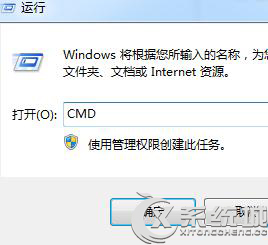
cmd
netsh winsock reset catalog
netsh int ip reset reset.log
此問題通常因區域連線與多個不支援的即用協定衝突導致。
Windows 7 提示 "Ping 不是內部或外部命令"?環境變數 Path 缺失 System32 修復
DVD 光碟機 Win 7 顯示 Code 52 無法驗證簽章?兩招修復教學(含指令法)
Win7 多張圖片輪播桌面背景:自訂切換間隔、隨機順序完整教學
Win7 禁止網頁背景音樂播放:音量合成器靜音瀏覽器 + IE 選項停用網頁聲音
Windows 7 硬碟分割區圖示異常/損毀?重新指派磁碟機代號快速修復
Windows 7 修改「我的文件」等使用者資料夾預設儲存位置
Win7 任務列建立下拉式快捷方式工具列,整理桌面圖示超整潔
筆記本 Win7 省電秘笈:電源計畫、螢幕亮度、USB 管理全方位延長續航