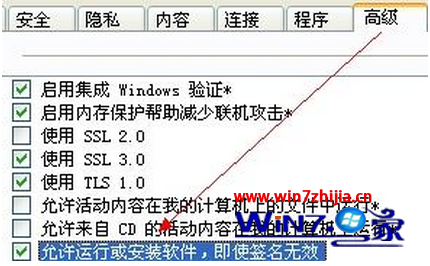
Windows 7 安裝軟體時 IE 跳出安全性警告「禁止安裝無效簽章」,解決方法:
注意:此設定降低安全性,僅建議在信任來源軟體安裝時暫時啟用,安裝完成後建議取消勾選恢復預設保護。
Win7 隱藏實用功能:計算機、便箋、媒體中心大揭密
Win7 關閉/清除搜尋歷史記錄:保護隱私的群組原則與手動刪除法
Win7 如何清除裝置管理員中的舊/隱藏裝置 (幽靈裝置)?環境變數法
Windows 7 禁止 SQL Server 開機自動啟動:msconfig 管理啟動項
Windows 7 最安全作業系統五大關鍵:核心防護、IE8 安全、UAC 滑桿、免費防毒、行動中心
Win7 遠端桌面無法連線 Win8?Win8 必須開啟「允許遠端連線」
Win7 與 XP 共存環境下的資源共享疑難雜症:共享印表機與 FTP 穿透防火牆
Win7 建立無線臨時網路 (Ad-hoc) 讓手機/平板共享上網圖文教學