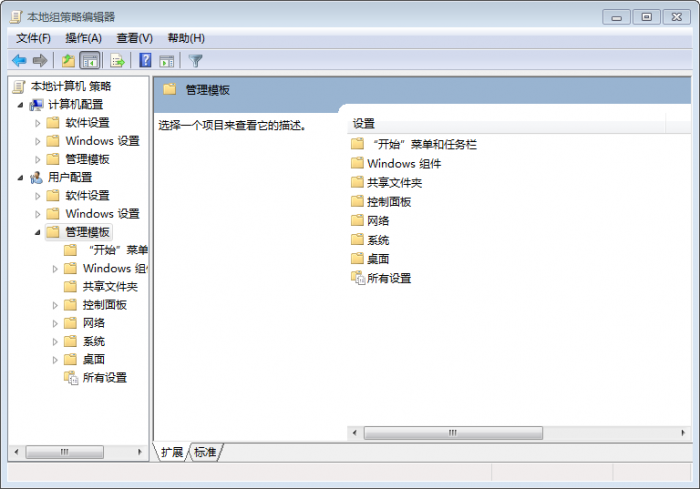
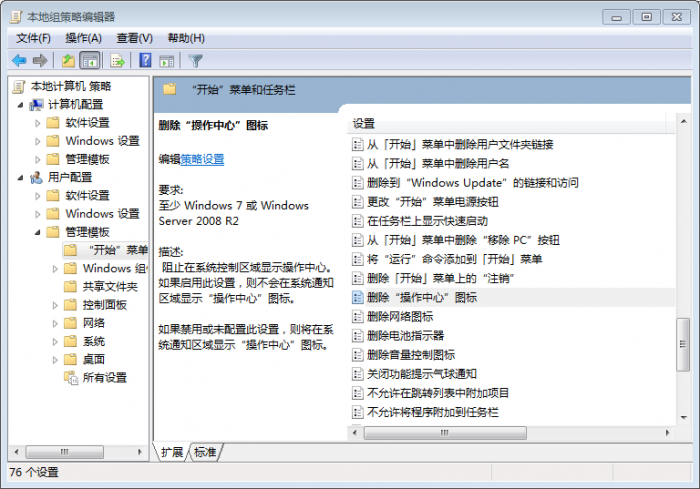
任務列右下角的紅叉小白旗(操作中心)可透過群組原則永久隱藏。
gpedit.msc
此設定僅隱藏圖示,不影響操作中心功能本身。
Windows 7 系統全方位加速指南:開機、關機、視覺特效與啟動項優化
微軟打擊 Win7 盜版:KB971033 偵測 70 種破解工具,桌面變黑
Win7 磁碟被寫入保護怎麼解除?登錄表與裝置原則雙重解除法
Win7 修改預設程式安裝路徑:登錄變更 ProgramFilesDir 減輕 C 槽負擔
Win7 內建防火牆進階技巧:自訂規則、允許程式通過、變更網路位置
Win7 建立隱藏帳號 (Shadow Account) 進階技巧
Windows 7 工作管理器看不到選單列/標題列?雙擊邊框一秒恢復
Win7 系統使用 Windows DVD Maker 製作相簿影片完整教學:匯入照片、設定特效、燒錄 DVD