開啟資料夾或檔案時跳出「引用了一個不可用的位置」,是使用者資料夾路徑在登錄表中設定錯誤所致。
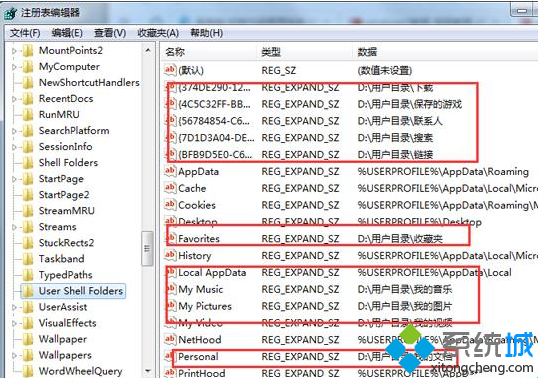
regedit
HKEY_CURRENT_USER\Software\Microsoft\Windows\CurrentVersion\Explorer\User Shell Folders
D:\Documents
修正路徑後即可正常存取檔案與資料夾。
Windows 7 安全模式完整操作指南:九大實用技巧
AHCI 模式讓 Windows 7 速度翻倍?啟用 NCQ 提升隨機存取效能
Win7 顯示副檔名設定:資料夾選項取消「隱藏已知檔案類型的副檔名」,防範惡意偽裝檔案
Win7 入門版三程式限制實測:並非視窗數限制、資源管理器/系統工具/安裝程式不計入
Ubuntu 10.10 關閉 USB 隨身碟自動掛載/自動開啟視窗設定
Win7 桌面捷徑圖示全變成同一個?註冊表修復 .lnk 檔案關聯與系統圖示重設雙管齊下
Win7 修復 .exe 執行檔關聯錯誤:註冊表修改法
Win7徹底禁用粘滯鍵彈窗:關閉快捷鍵觸發與無障礙設置