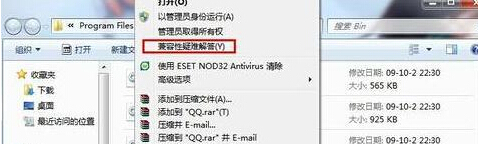
Windows 7 相容性極佳,但舊軟體仍可能出現不相容提示。內建 相容性疑難排解 可自動偵測並套用最佳相容設定。
多數舊軟體經自動偵測即可正常運行,避免手動嘗試各種相容模式。
Win7 登入 QQ 後音量忽大忽小?通訊軟體自動降低音量功能導致
Win7 如何屏蔽主機板內建音效卡?
Win7 17 個隱藏實用技巧:任務列捷徑、問題步驟記錄器、多時區時鐘...
Win7 查看無線密碼教學:無需工具即時顯示明文
Win7 系統如何開啟「寫字板」?兩種快速啟動方法
Win7 硬碟瘦身指南:透過「程式和功能」徹底移除不需要的軟體
Win7 安裝 QQ 錯誤 0x00008C02 解法:關閉安全軟體重裝
Windows 7 vs Windows XP 哪個更好?XP 相容性佳但停止支援,Win7 新技術豐富、主流硬體首選