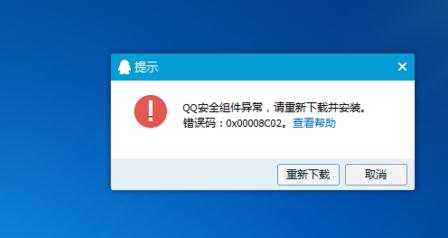
重灌系統後安裝 QQ 卡在 70%,啟動報「安全組件錯誤 0x00008C02」,原因是安全軟體(如 360)攔截安裝程式。
安裝騰訊軟體時請暫時關閉第三方安全軟體,避免組件被誤攔截。
搶攻 Windows 8:微軟明年 7 月起將開發重心全面轉移
Windows 7 家用進階版初體驗:桌面主題、任務列預覽、正版優勢
Windows 7 開機卡在「正在啟動」解決辦法
解決 HP QC 在 Windows 7 下無法正常運作的問題
筆電安裝 Win 7 後無法設定高解析度:更新顯示卡驅動程式突破限制
Win7 開機加速 6 大招:電源設定、碎片整理、關閉分頁檔清理、DLL 卸載、停用 NVIDIA 服務、登錄優化關機等待
Win7 右鍵選單多出「AMD Vision Engine Control Center」的移除指令
Windows 7 零售版全面補貨,盜版難題與正版優勢並存