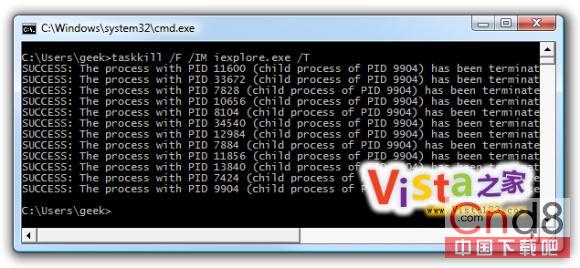
IE 8 多進程架構導致工作管理器出現多個 iexplore.exe,逐一結束繁瑣。使用 taskkill 一次終結所有同名進程:
iexplore.exe
taskkill
taskkill /F /IM iexplore.exe
操作步驟:
參數說明: /F 強制終止 /IM 指定映像名稱 /T 同時終止子進程(可選)
/F
/IM
/T
適用於任何多進程程式(Chrome、Firefox 等),比逐一右鍵結束程序樹高效得多。
Win7 刪除所有系統還原點釋放磁碟空間
解決 Win7 無法存取 XP 共享印表機與檔案
Windows 7 自動更新失敗/錯誤代碼?系統更新備妥工具一鍵修復
Win7 ADSL/路由器撥號上網完整設定:有線分享器與單機 PPPoE 兩種模式
Windows 7 內建 CPU 偵錶小工具:即時監控處理器使用率
Win7 系統出現錯誤代碼 0x80004005 該如何解決?
Windows 7 聲卡驅動無法安裝?權限保護導致,一鍵修復工具可解決
Win7 登入 163 信箱出現 0xc06d007e 錯誤的修復方法