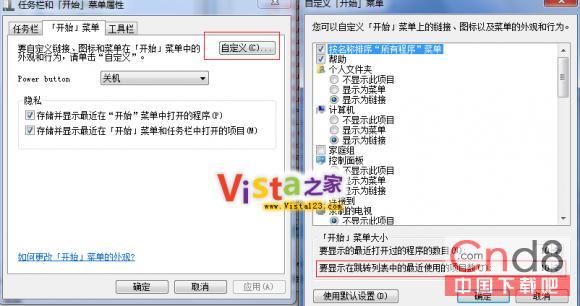
Windows 7 RC 起跳躍清單預設顯示 10 項近期文件,可透過開始選單屬性自訂數量。
增加項目數便於快速存取更多歷史文件,減少則可保護隱私、節省選單空間。
Win7 將程式釘選到任務列:未啟動/已啟動兩種情況操作法
Win7 內建防火牆進階技巧:自訂規則、允許程式通過、變更網路位置
Windows 7 修改資源管理器預設開啟位置:從程式庫改為電腦
Win7 無聲音輸出?將揚聲器設為預設裝置一鍵解決
Win7 與 XP 局域網共用設定完整流程:建立家庭群組、進階共用設定、雙向存取驗證
簡單百寶箱正版驗證雙重檢測:MD5 校驗與數位簽章完整教學
Win7只能開首頁無法進入二級網頁?DNS被竄改一鍵修復
Windows 7 RC 出現 UAC 權限 Bug:標準用戶無法建立子資料夾、部分軟體無法安裝