Win7 可直接查看已連線無線網路明文密碼,XP 做不到。
操作
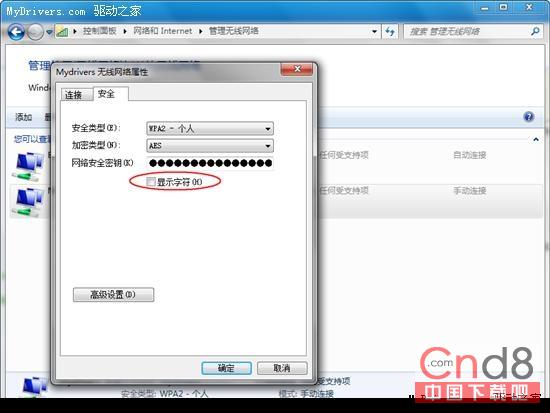
用途
安全提醒:實體接觸電腦者可輕易取得密碼,建議搭配螢幕鎖定與 MAC 過濾使用。
Win7 桌面應用技巧全集:托盤圖標顯示、快速顯示桌面、桌面小工具、工作列釘選
Win7 關閉 IE 自動儲存密碼:Internet 選項→內容→自動完成設定→取消「儲存密碼前提示我」
Win7 系統安裝 HP 5200LX 印表機完整驅動安裝教學 (USB 介面)
Windows 7 內建磁碟管理輕鬆掛載與建立 VHD 虛擬磁碟
Windows Update 找不到 Win7 SP1 更新怎麼辦?三大原因與解法
Win7 驅動程式自動更新造成不相容?群組原則禁止安裝非原則描述裝置
Windows 7 新增熱鍵大全:視窗控制、工作列、檔案總管、投影、放大鏡一覽表
Win7 開機自啟動項完整清查:啟動資料夾/msconfig/登錄檔 Run/Win.ini/System.ini/服務