下載的 Win7 主題包 (.themepack) 雙擊安裝無反應、不報錯。經測試發現:檔名第 9 個字元若為空格,會導致安裝程式解析失敗;第 10 字元或其他位置空格則正常。這是 Win7 主題安裝器的已知 Bug。
.themepack 檔案,按 F2 重新命名。.themepack 副檔名改為 .cab。.theme 檔案 (XML 格式),用記事本開啟。<ThemeDisplayName> 標籤內的名稱,刪除第 9 字元的空格。.cab (或直接雙擊修改後的 .theme 檔案套用)。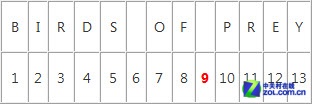
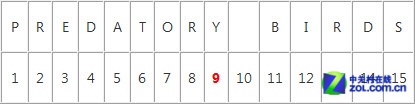
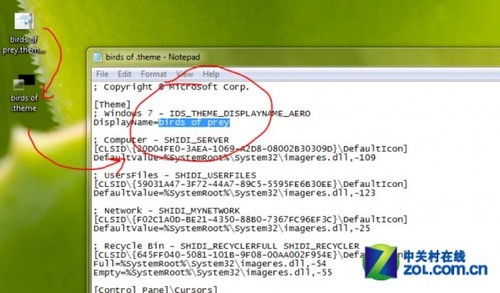
.themepack = .cab 容器。.theme (設定 XML)、壁紙資料夾、聲音資料夾。.theme 時,若 ThemeDisplayName 第 9 字元為空格,字串處理出錯導致靜默失敗。Get-ChildItem *.themepack | ForEach-Object {
$newName = $_.Name
if ($newName.Length -ge 9 -and $newName[8] -eq ' ') {
$newName = $newName.Remove(8,1)
Rename-Item $_ -NewName $newName
Write-Host "Renamed: $($_.Name) -> $newName"
}
}
在下載資料夾執行,自動修正所有檔名第 9 字元空格問題。