操作步驟
- 開啟 Windows Media Player 12。
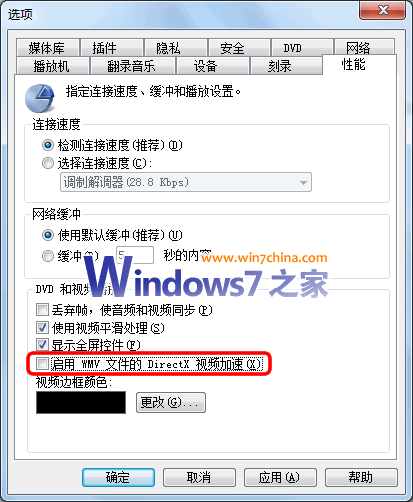
- 「工具」→「選項」 (若無工具列,按 Ctrl+M 或右鍵標題列勾選「工具列」)。
- 「效能」頁籤 → 取消勾選「啟用 WMV 檔案的 DirectX 視訊加速」。
- 確定,重開 WMP12 生效。
適用情境
- 播放 WMV/VC-1 影片出現綠畫面、花屏、卡頓、聲畫不同步。
- 顯示卡驅動程式較舊、不支援特定 DirectX 視訊加速功能 (DXVA)。
- 軟體解碼 (CPU) 在現代多核心 CPU 上效能已足夠,關閉硬體加速反而更穩定。
編輯點評
隨著硬體發展,早期 XP 時代依賴的硬體加速功能在 Win7 現代顯卡/驅動下反而可能導致相容性問題。用戶可依實際播放情況決定啟用/停用,以節省系統資源並提升穩定度。