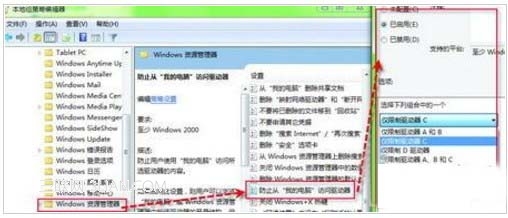
透過群組原則在總管隱藏指定磁碟機(如 C:),甚至「執行」輸入路徑也無法存取:
gpedit.msc
設定生效後,總管不見 C 槽,Win+R 輸入 C: 也無法進入,有效防止誤操作。需解除時改為「未設定」即可。
C:
Win7清除游戲記錄教程:保護隱私防止他人查看遊玩歷史
Win7 系統加速八大技巧:開機、關機、視窗、服務、字體、任務列、Aero 全面優化
Win7 滑鼠右鍵選單出現陰影殘影?關閉「選單淡出」效果即可解決
Windows 7 防火牆功能進化史:從 XP 簡易到三模式多設定檔企業級防護
Win 7 系統還原點完整指南:建立、還原、啟動修復、映像恢復 4 大模式
Windows 7 安裝 Microsoft 環回介面卡與找不到指定檔案修復法
Win 7 開機加速:停用 Diagnostic Policy Service (DPS) 等 4 大非必要服務實測
Win 7媒體中心進階玩法:四招打造全格式支援的個人影音中心