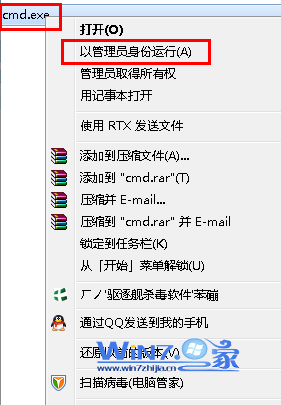
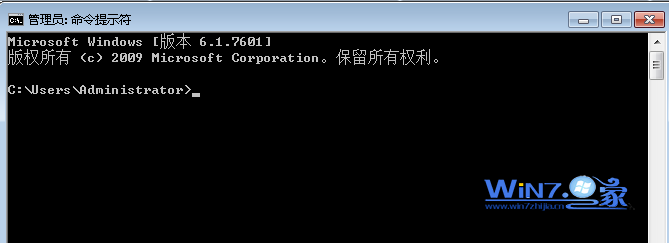
執行 regsvr32 xxx.ocx 提示註冊失敗,通常是權限不足。解法:以系統管理員身分開啟命令提示字元再執行。
regsvr32 xxx.ocx
cmd
regsvr32 "C:\完整\路徑\xxx.ocx"
若仍失敗,檢查: ① 檔案是否存在、未損毀 ② 是否為 32 位元元件在 64 位系統需用 %windir%\SysWOW64\regsvr32.exe ③ 相依 DLL 是否缺失 (用 Dependency Walker 檢查)
%windir%\SysWOW64\regsvr32.exe
Win7 開機「Intel RST 服務未在執行」完整修復:BIOS 設定、服務啟動、相依服務檢查
讓 Windows 7 睡眠喚醒後自動撥號上網 任務排程器實作
Win7 清理通知區域多餘圖示:註冊表刪除 PastIconsStream 舊項目
Win7 頻繁死機實戰排查:記憶體金手指氧化、BIOS 更新、IE/Chrome 皆死、硬體接觸不良為主因
Windows 7 程式回應時間過長?修改登錄縮短等待逾時
善用「系統設定」工具 3 秒查詢 Windows 7 常用命令變身指令高手
Win7/8.1 免費升級 Win10 完整教學:正版授權與 Insider 計畫雙軌
Win7 讓機殼喇叭與耳機同時出聲:Realtek 音效管理器多串流模式設定