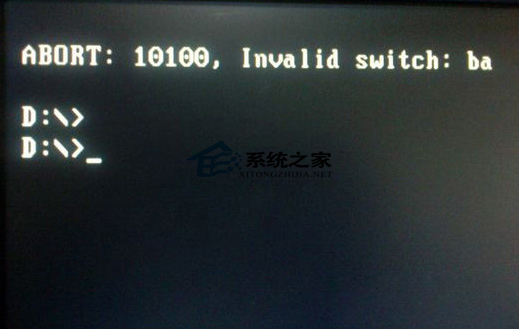
使用 Ghost 還原 Win7 映像檔時出現錯誤 10100,常見成因與解決方案整理如下。
逐項排查上述項目,多數可解決錯誤 10100 問題。
徹底隱藏 Windows 7 任務欄「小白旗」操作中心圖標,保持桌面乾淨
Win7 啟用 AHCI 模式完整教學:SSD 效能最大化,避免藍屏關鍵步驟
Win7 「圖片拼圖板」小工具如何新增自訂圖片?修改設定檔與圖片規格完整教學
Win7 區域網路搜尋不到網路印表機?啟用 LMHOSTS 查詢與 NetBIOS over TCP/IP
Win7 使用啟動工具後出現黑畫面的解決方案
Win7 虛擬記憶體從 C 盤移至 D 盤釋放系統盤空間:效能選項手動指定分頁檔位置
Win7 筆記本一鍵切換視訊輸出模式:Win+P 組合鍵,投影簡報零壓力
Windows 7 變慢?可能是「顏色校正」產生的 ICC 設定檔拖累效能