電腦開機緩慢是許多 Win7 用戶的困擾。針對 NVIDIA 顯示卡用戶,禁用 nvcpl 服務可有效縮短開機時間,但此方法僅適用於 Win7 64 位元系統。
services.msc 按 Enternvcpl.exe 相關服務)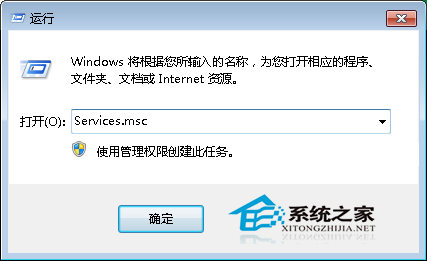
簡單幾步驟即可讓 64 位元 Win7 開機更迅速,建議搭配其他開機優化設定效果更佳。
Win7 QQ 語音麥克風沒聲音怎麼辦?硬體檢查與錄音裝置設定全攻略
Windows 命令列高效修改註冊表:reg add 參數詳解與實戰範例
Win7 VNC 客戶端連線 Red Hat Linux AS 5.8 完整設定教學
Medion 推出 Akoya E1217 上網本,預裝 Windows 7 Starter 售 300 英鎊
Windows 7 內建圖片檢視器不支援 GIF 動畫?安裝 ImageViewer for Windows 7 外掛完美解決
遠端桌面連線 Win7 只能登出/斷開?用 shutdown 指令遠端關機重開機